
What is Copy.ai?
Copy.ai is an AI-powered writing and automation tool designed to help people not only create content, but also manage and improve their marketing communication. While many people think of Copy.ai as just a tool for generating text, it actually works more like an AI assistant or AI agent, especially for tasks such as email marketing, sales outreach, and business communication.
Instead of only helping you write individual pieces of content, Copy.ai can support entire workflows. This means it can help you plan, write, refine, and optimize messages that are used repeatedly in real business situations.
In simple words, Copy.ai acts like a smart team member. You tell it your goal — for example, promoting a product, reaching out to customers, or following up on emails — and it helps you handle the writing part efficiently.
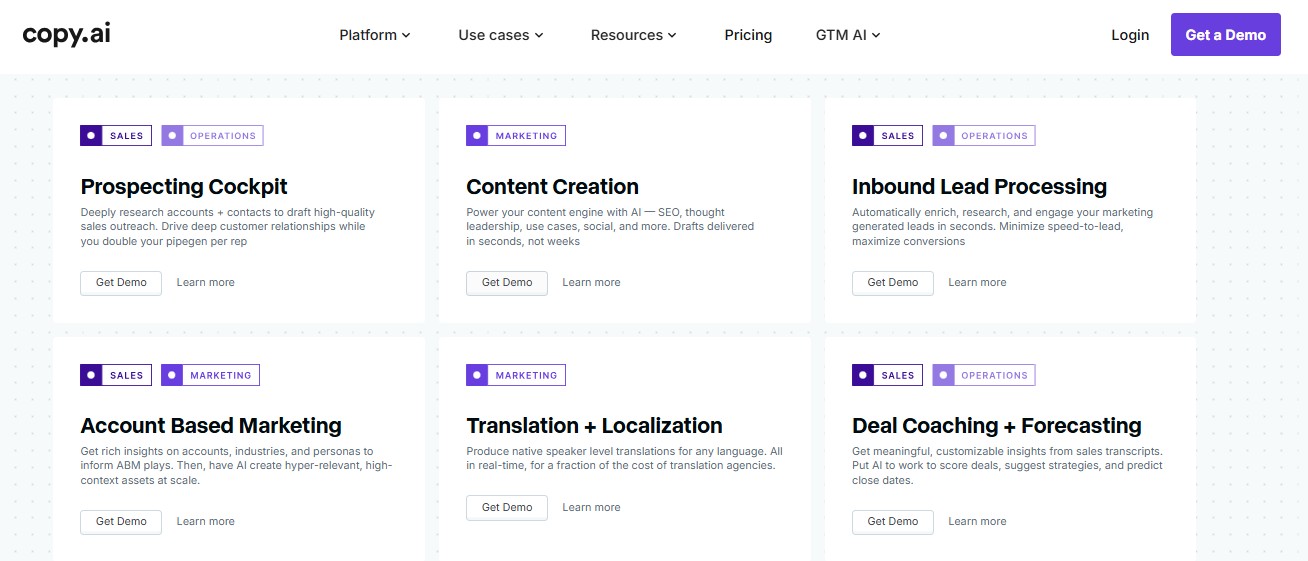
If you look at the image above, you’ll notice that it has been taken directly from Copy.ai’s official website, where they clearly define the platform’s capabilities. This screenshot shows that Copy.ai is not limited to basic content generation. Instead, it highlights how the tool is designed to support multiple business functions such as marketing, sales, email communication, and workflow automation. The official breakdown makes it clear that Copy.ai positions itself as an AI assistant that helps teams handle real-world tasks more efficiently, rather than just producing random pieces of text.
Key Features of Copy.ai
This AI-powered platform offers practical features that go beyond basic text generation. It focuses on real business use cases, making it especially useful for marketing, sales, and team communication.
1. Content Creation for Different Needs
The tool can generate content for blogs, websites, social media, advertisements, and product pages from a simple idea or short description.
Why this is good and different
Unlike normal ChatGPT, which usually responds to one prompt at a time, this platform is designed around specific content formats. It delivers more structured and purpose-driven output, which reduces editing time and makes the content feel more ready to publish.
2. Email Marketing and Sales Communication
It helps create marketing emails, sales outreach messages, follow-ups, and customer communication in a clear and professional way.
Why this is good and different
Most AI tools generate single emails, but this solution supports full email sequences. This makes it more practical for real campaigns where message flow and consistency are important.
3. Workflow-Oriented Assistance
The platform supports complete workflows instead of isolated writing tasks, helping with repeated processes like onboarding, lead outreach, or promotional campaigns.
Why this is good and different
Basic AI chat tools require repeated manual prompts. This assistant is built for repeatable business tasks, making it more efficient and scalable for long-term use.
4. Tone and Style Customization
Users can adjust the tone of the content to match their audience, whether it needs to sound professional, friendly, or persuasive.
Why this is good and different
While many alternatives offer tone options, this platform applies tone consistently across longer content and sequences, helping the writing sound more natural and aligned with a brand voice.
5. Collaboration for Teams
It allows multiple team members to create, review, and manage content in one shared workspace.
Why this is good and different
Normal ChatGPT is mostly designed for individual use. This platform is built for teams, which makes it more suitable for businesses that rely on collaboration and shared content.
6. Simple and Beginner-Friendly Interface
The interface is clean and easy to navigate, making it suitable even for users who are new to AI tools.
Why this is good and different
Many alternatives require prompt experimentation to get good results. This platform focuses on ease of use, helping users get valuable output quickly without technical knowledge.
Copy.ai Pricing and Plans
If you’re thinking about trying Copy.ai, it’s helpful to understand the pricing and which plan might suit you best. The platform offers options for everyone — from beginners just exploring AI writing, to businesses that need advanced tools and team collaboration.
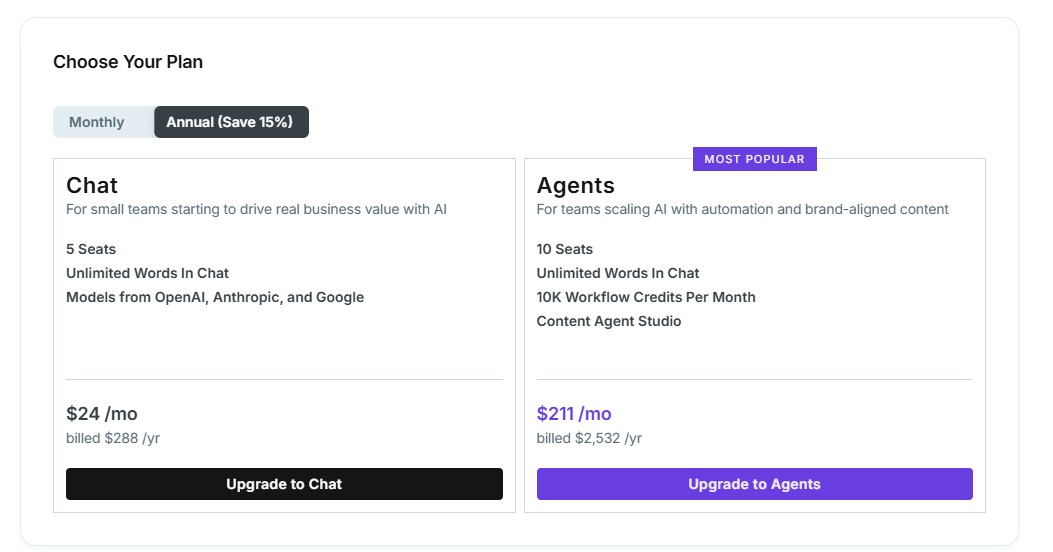
Take a look at the image above — I’ve taken a screenshot from the official site showing their plans and pricing. It clearly breaks down what each plan offers, so you can see which one fits your needs.
Free Plan
If you’re just getting started or want to try the platform without paying anything, the Free Plan is a great way to explore how it works before upgrading. This plan gives you basic access to the core features, and it doesn’t require a credit card — so you can start right away without any risk. Copy.ai Help Center +1
Here’s what you get with the free tier:
-
1 User Seat – Only one person can use the account, which makes it ideal for individuals, freelancers, or solo creators. Copy.ai Help Center
-
Monthly Word Limit – You can generate up to about 2,000 words per month in chat, which lets you test the assistant for short content, captions, emails, and quick ideas. Copy.ai Help Center
-
Access to Core Models – You can use reliable AI models such as ChatGPT 3.5 and Claude 3 to generate text, giving you a feel for the capabilities without paying. Pricingify
-
Brand Voice & Infobase Access – Even on the free plan, you can experiment with basic brand voice customization and the Infobase feature to keep your content consistent. Copy.ai Help Center
-
Unlimited Projects – You’re not limited in how many separate content pieces or project folders you create, so you can organize your work better. Aitoolsbee
This plan gives you enough power to test the main tools — from simple copy and social captions to short product descriptions or email drafts — without any financial commitment. It’s a useful way to see how the platform fits your workflow before deciding whether to upgrade.
Chat Plan – For Small Teams
This plan is ideal for small teams that are just starting to use AI for real business value.
-
Seats: 5 users
-
Words: Unlimited words in chat
-
AI Models: Access to models from OpenAI, Anthropic, and Google
-
Price: $24 per month (billed $288/year)
This plan is perfect for small teams just starting to use AI in their daily work. It provides unlimited chat words and access to multiple AI models, so your team can experiment, collaborate, and complete small projects efficiently.
Example use case:
Imagine a marketing team of 5 people who need to quickly draft social media posts, short emails, or internal messages. With the Chat plan, everyone can generate content at the same time without worrying about word limits. It’s ideal for teams taking their first steps with AI and testing how it fits into their workflow
Agents Plan – Most Popular
The Agents plan is designed for teams scaling AI with automation and brand-aligned content.
-
Seats: 10 users
-
Words: Unlimited words in chat
-
Workflow Credits: 10,000 per month
-
Extra Features: Content Agent Studio
This plan is built for growing teams that want to automate content creation, manage workflows, and maintain brand consistency. It includes workflow credits and advanced tools like the Content Agent Studio, giving teams more power and flexibility.
*Pro tip: You can save 20% by opting for annual billing instead of monthly. And remember, the 7-day free trial lets you explore both plans risk-free before making a decision. Try Copy.ai
Example use case:
Picture a team of 10 creating content for multiple marketing channels, running email campaigns, and posting regularly on social media. With the Agents plan, they can automate follow-up emails, generate multiple variations of ad copy, and ensure every piece aligns with their brand voice. It’s perfect for teams that rely heavily on AI to handle larger-scale content workflows efficiently.
Pros and Cons of Copy.ai
Pros
- Saves Time on Writing – Quickly generate blog posts, social media content, product descriptions, and emails, which saves hours compared to writing manually.
- Supports Teams and Collaboration – Multiple seats and team plans allow several users to work together, edit content, and stay aligned.
- Versatile Content Options – Covers almost every type of written content, from ads and emails to social posts and long-form articles.
- Customizable Tone and Style – Adjust content to be professional, friendly, persuasive, or casual, keeping your brand voice consistent.
- Workflow and Automation Friendly – Especially with higher-tier plans, you can automate sequences, generate multiple variations, and manage repeated tasks efficiently.
- Beginner-Friendly Interface – Clean, intuitive interface that’s easy to navigate even for users who have never used an AI tool.
Cons
- Free Plan Restrictions – Limited monthly words and only one user seat, which can be too small for regular use or teams.
- Workflow Credit Limits on Mid Plans – Some plans have workflow credits (like the Agents plan), and exceeding them may require waiting for a reset or upgrading.
- Advanced Features Behind Higher Tiers – Features like Content Agent Studio and advanced automation are only available in higher-level plans.
- Pricing for Teams – For larger teams needing multiple seats and advanced features, the subscription cost can be high.
- Less Control Over Output Structure – Long-form content or structured workflows sometimes require extra manual editing and organization.
Who Should Use Copy.ai?
Copy.ai is designed to help anyone who needs to create written content faster and more efficiently. It’s not just for big businesses or marketing experts — it’s useful for a wide range of users.
Small Businesses and Startups
If you run a small business or startup, you often handle multiple tasks at once. Copy.ai can help you create product descriptions, emails, social media posts, and website content quickly, saving time and helping you maintain a professional voice.
Marketing and Sales Teams
Marketing and sales professionals can benefit from workflow tools, email sequences, and content automation. This makes it easier to scale campaigns and maintain a consistent brand voice across multiple channels.
Freelancers and Content Creators
For freelancers or content creators, Copy.ai can speed up idea generation and reduce writer’s block. You can quickly draft blog outlines, social media captions, ad copy, or client deliverables without spending hours starting from scratch.
Teams of All Sizes
Whether you’re a solo operator or part of a larger team, Copy.ai offers plans that scale with your needs. Small teams can collaborate efficiently, while larger teams can automate workflows and ensure consistent content production.
Anyone Looking to Save Time
Even if you don’t fall into a specific category, Copy.ai is helpful for anyone who wants to save time on repetitive writing tasks, such as emails, social posts, ads, or product descriptions.
Who Should NOT Use Copy.ai?
Copy.ai is a powerful tool, but it’s not the best fit for everyone. If you only need content occasionally, or if you’re on a very tight budget, paying for advanced plans may not be worthwhile. It’s also less suitable for highly specialized or technical content, such as legal, scientific, or niche technical writing, where accuracy is critical. Additionally, users expecting fully hands-off automation may be disappointed, as some level of review and editing is still necessary to ensure quality and brand alignment. Understanding these limitations helps you decide if Copy.ai is the right fit for your workflow.
Final Verdict: Is Copy.ai Worth It?
If you ask me, I’d say Copy.ai is definitely worth trying, especially if you create content regularly or run a business that relies on marketing and communication. I’ve seen how much time it can save, whether it’s drafting emails, writing social media posts, or generating blog ideas — instead of staring at a blank page, you get a strong starting point within seconds.
I think it’s particularly valuable for small teams, freelancers, and marketers who want to boost productivity and maintain a consistent brand voice. Even if you’re a beginner, the platform is intuitive and easy to use, so you don’t need to be a tech expert to get results.
Of course, it’s not perfect — if you only write content occasionally, or if you need highly technical or specialized writing, it may not be the right fit. But for most creators and businesses, I feel the time saved and workflow improvements outweigh the costs, especially if you use the Pro or Agents plans effectively.
Overall, I’d recommend starting with the free plan to test it out and see how it fits your workflow. Once you experience how much faster and easier content creation can be, upgrading becomes an easy decision.
Ready to speed up your content creation and generate marketing copy effortlessly? Try Copy.ai and see how it can transform your workflow today!